
Custom SharePoint Development to Boost Efficiency with a Distinct Enterprise Experience
Many companies still struggle with slow approvals, scattered documents, and poor collaboration. A McKinsey report shows that employees spend up to 20% of their workweek just searching for internal information. That’s a whole day lost every week.
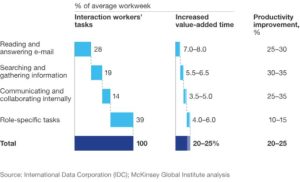
This is where SharePoint custom development can help. Instead of using a one-size-fits-all setup, custom solutions let you design portals, workflows, and apps that match your business needs. The result is faster processes, better teamwork, and fewer mistakes.
With the right custom SharePoint development services, businesses can connect systems, automate daily tasks, and scale without hitting roadblocks. Whether you’re a small team or a global enterprise, customization makes SharePoint work the way you do, not the other way around.
Key Benefits of SharePoint Custom Development for Business Efficiency
Furthermore, Custom SharePoint development provides businesses with specialized solutions that facilitate effective teamwork, workflow optimization, and project management.
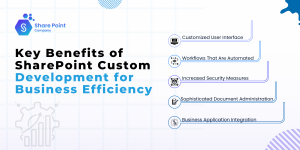
1. Customized User Interface
SharePoint customization can improve the user interface by giving staff members a layout that complements their workflow and boosts output. Furthermore, in some businesses, it has been shown that a straightforward and easy-to-use interface can boost user engagement by as much as 40%.
2. Workflows That Are Automated
SharePoint’s custom workflows save manual labor by streamlining repetitive processes. Moreover, businesses claim that automation increases productivity by over 30%, particularly for repeated operations like content reviews and approval procedures.
3. Increased Security Measures
SharePoint enables teams to customize security settings, protecting confidential information. Furthermore, businesses with improved SharePoint security report a 20% decrease in collaboration tool security issues.
4. Sophisticated Document Administration
Moreover, improved metadata management and document versioning are made possible by custom SharePoint solutions. Furthermore, it is anticipated that around 60% of businesses will have fully integrated document management systems by 2024, which would reduce the amount of time spent searching for documents.
5. Business Application Integration
Custom integration features in SharePoint guarantee smooth communication with other business tools like ERP and CRM programs. Furthermore, teams can more easily access vital data in real time thanks to this connection, which improves data accessibility by 25%.
Business procedures are being reshaped by digital transformation, making seamless data integration and efficient communication crucial. Furthermore, a dynamic option that allows businesses to create a highly personalized environment to improve productivity is bespoke SharePoint development.
SharePoint Custom Development Features to Enhance Enterprise Experience
SharePoint’s corporate capabilities have been further expanded by new features and upgrades, many of which can be tailored through custom SharePoint development services to maximize business impact.
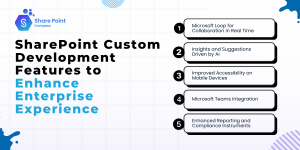
1. Microsoft Loop for Collaboration in Real Time
SharePoint’s Microsoft Loop integration, which was first introduced in 2023, facilitates real-time, cross-functional collaboration and improves the efficiency of content co-authoring across many Microsoft applications.
2. Insights and Suggestions Driven by AI
Microsoft introduced AI-driven suggestions in 2024, which assist users in finding relevant documents quickly and identifying team members for collaboration based on current activity. Furthermore, personalization powered by AI can increase productivity by up to 35%.
3. Improved Accessibility on Mobile Devices
Users can now operate on mobile devices with ease thanks to SharePoint’s new mobile enhancements. Given that 70% of the world’s workforce is expected to access company data via mobile devices by 2024, this mobile-first strategy is essential.
4. Microsoft Teams Integration
Employees can use SharePoint resources in a single workplace without navigating between apps thanks to the stronger connection with Microsoft Teams. Furthermore, up to 20% more user efficiency is anticipated as a result of this alignment.
5. Enhanced Reporting and Compliance Instruments
Moreover, SharePoint’s most recent compliance improvements provide stronger reporting capabilities while adhering to industry security standards. Enterprise application development helps 90% of businesses place a high priority on data security throughout their digital transformation efforts. These compliance enhancements are essential.
Widely used for document management and team communication, Microsoft SharePoint offers adaptable capabilities that, when extended with SharePoint custom development, can be tailored to unique business requirements—helping organizations to improve user experience, improve cooperation, and expedite data access.
Related Blog: How Microsoft Copilot in SharePoint is Transforming the Modern Workspace?
Standard SharePoint vs SharePoint Custom Development: Key Differences
Compared to the conventional SharePoint configuration, custom SharePoint development services offer more customized functionality designed around business needs. Here’s how:
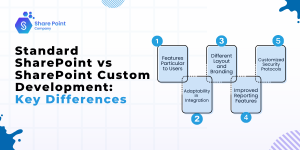
- Features Particular to Users
Standard SharePoint has many capabilities, but custom development tailors solutions to departments or user roles, increasing productivity by around 25%.
- Adaptability in Integration
Moreover, basic integration is possible with standard SharePoint, but bespoke development can provide APIs for customized integrations that guarantee smooth processes.
- Different Layout and Branding
Furthermore, Custom SharePoint enables businesses to include branding components, giving the whole company a consistent appearance and feel that encourages employee ownership.
- Improved Reporting Features
Basic statistics are provided by standard SharePoint, but deeper insights into team performance and resource allocation are made possible by custom reporting features.
- Customized Security Protocols
By ensuring that security procedures are customized to meet the unique compliance requirements of the business, custom development successfully reduces the risk of data breaches.
While standard SharePoint provides a solid foundation, businesses unlock higher efficiency, scalability, and compliance when they choose SharePoint custom development tailored to their goals.
How SharePoint Custom Development Benefits Both B2B and B2C Businesses
Both B2B and B2C situations can benefit from custom SharePoint development services, helping companies create tailored solutions for collaboration and customer engagement. Furthermore, this is how it has an impact:
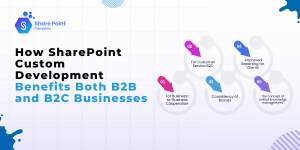
- For Business-to-Business Cooperation
SharePoint can be configured to interface with partner systems in business-to-business (B2B) settings, enabling more efficient project collaboration and instantaneous document exchange.
- For Customer Service B2C
Furthermore, SharePoint can be tailored for customer service operations by B2C businesses. Helping support teams quickly access client histories and support materials.
- Consistency of Brands
By enabling both B2B and B2C businesses to portray a consistent brand image throughout their staff, custom branding capabilities help to increase customer and client confidence.
- Improved Reporting for Clients
SharePoint’s custom reporting features can help B2B businesses by giving customers access to real-time project progress information and frequent updates.
- The concept of unified knowledge management
A single knowledge base in SharePoint facilitates quicker replies to client inquiries for business-to-consumer transactions, improving the user experience in general.
By investing in SharePoint custom development, businesses in both B2B and B2C sectors can deliver a smoother user experience while strengthening relationships with partners and customers.
The Future of SharePoint Custom Development in a Cloud-First World
Moreover, SharePoint and custom SharePoint development services are becoming a crucial component of cloud-based collaboration and information management as cloud computing shapes business plans. Furthermore, according to Gartner, more than 80% of big businesses will have used cloud-based SharePoint for their staff by 2026. Important trends consist of:
- Compatibility with Hybrid Cloud
SharePoint is being used more and more in hybrid cloud settings, which enables businesses to strike a balance between flexibility and data protection.
- Integration of AI Growth
Furthermore, personalized user experiences and more intelligent processes will be made possible by AI-powered SharePoint solutions.
- Expanded Remote Access
Businesses are concentrating on SharePoint’s mobile access to sustain productivity as remote work becomes more common.
- A Greater Emphasis on Security Compliance
As data privacy laws become more stringent, custom SharePoint development services will probably concentrate on improving compliance features.
- Expanding Cooperation Across Boundaries
It is anticipated that SharePoint’s function in promoting cross-border cooperation will grow, meeting the demands of an increasingly international workforce.
Final Thoughts
Every business has unique goals, and a one-size-fits-all tool often falls short. That’s where custom SharePoint development services make a real difference. By tailoring SharePoint to match workflows, teams save time, reduce errors, and work together more smoothly.
Whether it’s B2B or B2C, custom solutions bring stronger security, easier integrations, and a better user experience. With the rise of cloud and mobile work, SharePoint custom development will only become more important in helping companies stay connected and efficient.
If your business wants to improve teamwork, secure data, and scale for the future, now is the right time to explore custom SharePoint solutions tailored to your needs.
FAQs
-
How can organizations profit from bespoke SharePoint development?
Custom SharePoint development gives businesses tools that fit the way they work. Teams get easy-to-use dashboards, faster workflows, and better document control. With automation and smooth integration into other systems, companies can save time and increase output by up to 30%.
-
How is SharePoint’s productivity enhanced by AI integration?
AI in SharePoint makes daily work smarter. It suggests files you need, highlights the right people to work with, and even sorts documents for you. These features save time and can improve team efficiency by about 35%.
-
What distinguishes standard SharePoint from custom SharePoint?
Standard SharePoint gives basic tools for teamwork and file sharing. Custom SharePoint goes further by adding workflows. It adds workflows, branding, stronger security, and deeper connections with other business apps. Companies using custom SharePoint often see 20–25% more productivity compared to the standard setup.
-
Can custom SharePoint development work with tools like CRM or ERP?
Yes. SharePoint can be connected with systems like CRM or ERP through custom development. This helps teams see all important data in one place, without switching between apps. It makes work faster and reduces mistakes.
-
Is custom SharePoint development only for big companies?
No. Small and medium businesses can also use it. Custom features can be built to fit their size, budget, and goals. Even simple changes like workflow automation or better file management can save time and money.
-
How does custom SharePoint help with data security?
With custom settings, businesses can control who can see or edit certain files. This keeps sensitive data safe and makes it easier to follow industry rules. Strong security builds trust with both clients and partners.
-
What is the cost of custom SharePoint development?
The cost depends on what features a business needs. Simple changes cost less, while complex integrations or large projects require a bigger investment. Many companies find the return on investment worth it because it saves time and improves efficiency in the long run.