
SharePoint vs Teams: Empowering Executive Decision-Making:
Microsoft SharePoint and Microsoft Teams are two leading platforms that revolutionize workplace collaboration. Both tools are designed to boost productivity, streamline workflows, and enhance communication. However, for executives responsible for strategic decision-making, understanding the difference between Teams and SharePoint is crucial. It’s equally important to explore how these collaboration tools complement each other to unlock their full potential and optimize business operations. In this blog, we’ll explore the key features, differences, and unique synergies to help you make informed choices and leverage these platforms effectively. Let’s dive in!
Microsoft SharePoint: A Hub for Document Management and Collaboration
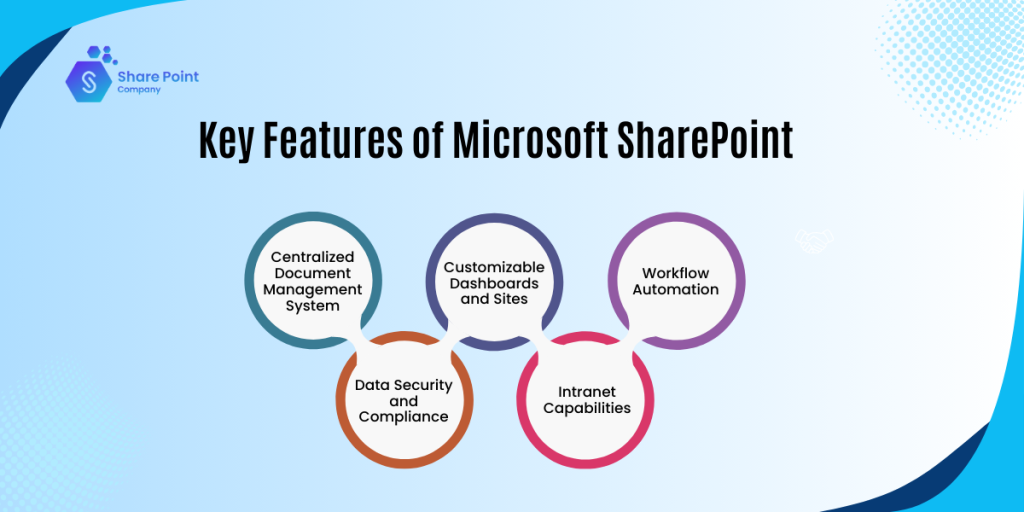
SharePoint is a robust and versatile platform, that allows businesses to store, organize, and manage documents in a centralized and secure manner. Additionally, this comprehensive collaboration tool offers intranet portals, manages workflow, and integrates with other Microsoft 365 tools and platforms. Now, let’s walk through the key features of Microsoft SharePoint for decision-making in detail:
1. Centralized Document Management System:
SharePoint allows businesses to store all the critical documents in one centralized place, ensuring these can be accessed by authorized users, anytime, anywhere. Executives can significantly locate the essential reports, contracts, or analytics, and thus, eliminating the inefficiencies of scattered files. This feature also ensures users can track the changes made over the documents and access the historical versions whenever needed.
2. Customizable Dashboards and Sites:
SharePoint provides flexibility to users to design department-specific sites, and thus, these can be customized to include dashboards to attain real-time insights. With this feature, executives can monitor project updates, financial reports, or KPIs from a single location.
3. Workflow Automation:
SharePoint offers an advanced feature, i.e., workflow automation, ensuring businesses streamline processes, including document approvals, notifications, and tasks assignments. This automation significantly reduces bottlenecks, allowing executives with ample time to levy their primary concern towards strategic decisions.
4. Data Security and Compliance:
With features like role-based permissions, audit logs, and data encryption, SharePoint protects the sensitive data of the business. This also ensures confidence in the security of proprietary and confidential data.
5. Intranet Capabilities:
Microsoft SharePoint also promotes its feature of intranet, enabling businesses to build intranet for centralized communication and access to resources like policies, templates, and internal announcements. This feature is significantly beneficial for businesses to promote transparency and alignment across departments.
Microsoft Teams: A Real-Time Communication and Collaboration Tool:
Now, you might have an idea about the features of Microsoft SharePoint. So, let’s look at the key features of Microsoft Teams, to understand the difference between SharePoint and Teams in a better way.
Being a collaboration tool, SharePoint levies its focus on document and content management, however, Microsoft Teams excels in real-time communication and collaboration. Being a chat-based collaboration tool, Teams helps businesses integrate video calls, messaging, and file sharing to bring employees together, irrespective of their location.
1. Instant Communication:
Teams offer the feature of instant communication, allowing executives to quickly connect with their team members over chat, audio, or video calls. This feature also opens the gateway for businesses to address urgent decisions without delays, enabling a faster problem-resolving platform. Eventually, executives can organize the conversions project-wide or department-wise using teams.
2. Integrated Meeting Capabilities
Teams help businesses by simplifying the scheduling and hosting of virtual meetings using its in-built applications, i.e., calendars, reminders, or real-time document sharing. Also, executives can easily access reports or presentations during a meeting without switching platforms.
3. Collaborative Workspaces
Teams promote the feature of collaborative workspaces, enabling employees to co-author files in real time. This feature significantly ensures transparency and collaboration during decision-making processes, especially when reviewing reports or proposals.
4. Third-Party App Integration
Microsoft Teams supports integration with several third-party applications, allowing businesses to bring all necessary tools, like project management apps, analytics dashboards, and CRMS into a single interface.
5. Activity and Status Tracking:
Using Teams, executives can significantly monitor team activity and project updates in real-time, ensuring they can intervene proactively if any concern arises, or deadlines are at risk.
SharePoint vs Teams: Key Differences that Users Must Know:
After having a thorough idea about the key features of SharePoint vs Teams, here’s a comparison of Teams vs SharePoint to help understand their distinct functionalities:
| Feature | SharePoint | Teams |
| Primary Purpose | Document management and intranet solutions | Real-time communication and collaboration |
| Storage and Files | Centralized file repository with version control | File sharing integrated into chat and channels |
| Communication | Limited to announcements and intranet news | Instant messaging, video calls, and channels. |
| Workflow Automation | Advanced automation using Power Automate. | Basic automation within conversations and tasks |
| User Experience | Designed for structured, long-term collaboration. | Designed for dynamic, real-time interactions |
| Customization | Highly customizable sites and dashboards. | Predefined interface with app integrations |
| Best Use Cases | Document-heavy projects, intranet, and workflows | Dynamic communication, team collaboration, and meetings. |
Teams vs SharePoint: When to Use These Collaboration Tools:
Every business has a unique requirement at their workspace and thus, it becomes uneasy to decide between SharePoint vs Microsoft Teams. So, we are highlighting some use cases based on the key features of these collaboration tools in this section. Let’s understand the use cases of SharePoint vs Teams in detail:
| WHEN TO USE MICROSOFT TEAMS | |
| Dynamic Team Communication | Best for real-time collaboration and communication across teams. |
| Project-Specific Work | Suitable for short-term or fast-moving projects requiring constant updates. |
| Remote Work | Ideal for geographically dispersed teams needing instant connectivity. |
| Quick Decision-Making | Perfect for executives needing to resolve issues or make decisions promptly. |
| WHEN TO USE MICROSOFT SHAREPOINT | |
| Centralized Document Management | Ideal for storing and managing large volumes of documents with advanced organization and search capabilities. |
| Intranet Solutions | Best for creating internal communication hubs and resources. |
| Compliance and Governance | Suitable for industries with stringent data security and compliance requirements. |
| Long-Term Collaboration | Perfect for projects requiring detailed workflows and structured collaboration. |
How Do SharePoint and Teams Complement Each Other?
Though Teams vs SharePoint serve distinct purposes, they complement each other seamlessly within the Microsoft 365 ecosystem. Here’s how:
1. File Management:
Firstly, files shared by any employee or executive are simultaneously stored in the corresponding SharePoint Site, creating a robust file management system. Additionally, this ensures businesses can access these files anytime, and anywhere, keeping them safe from cyber threats or unauthorized access.
2. Structured Collaboration Meets Real-Time Communication:
With its structured environment for managing projects, SharePoint is an ideal platform for businesses. However, Teams enable dynamic discussions and updates. Together these collaborative tools create a balanced collaboration ecosystem.
3. Automation Across Platforms:
Both Microsoft SharePoint and Microsoft Teams offer a feature of workflow automation, i.e., workflows initiated in SharePoint can trigger notifications or actions in Teams. This cross-platform automation ensures smooth execution of processes and operations of the business.
Related Blog: How SharePoint Automation Enhances Business Operations?
4. Unified User Experience:
Being collaborative tools by Microsoft, SharePoint and Teams integrate with Microsoft 365 applications, ensuring executives or users to switch among document management and communication tasks.
SharePoint vs Microsoft Teams: Empowering Executives:
For executives, combining SharePoint and Teams offers a holistic approach to decision-making. SharePoint ensures access to organized, accurate information for long-term planning, while Teams provides a platform for quick discussions and immediate resolutions. By leveraging both tools strategically, executives can:
- Access Critical Data Quickly: Use SharePoint for reports and Teams for real-time updates.
- Enhance Collaboration Across Teams: Facilitate discussions while ensuring document security and organization.
- Make Data-Driven Decisions: Use analytics from SharePoint and feedback from Teams to guide decisions.
The Final Thoughts:
Deciding between SharePoint vs Teams as an ideal collaboration tool at workspace completely relies on the unique and evolving organizational needs and preferences. While Teams excels in dynamic, real-time collaboration, SharePoint provides the structure and scalability needed for managing content and workflows.
For most businesses, the combination of SharePoint and Teams offers the best of both worlds, ensuring seamless collaboration, better decision-making, and enhanced productivity. Additionally, with the right approach, SharePoint and Teams can transform the way your organization collaborates and makes decisions, empowering executives to lead with confidence and precision.