
Everything You Need to Know About Microsoft SharePoint
Having an organized workspace where all the latest documents are available in a single platform is a dream for many organizations. While Slack and Google Workspace are good options for eliminating document chaos, Microsoft SharePoint takes it up a notch.
Whether you’re a start-up or an enterprise, Microsoft SharePoint development acts as a centralized hub for:
- Reducing data silos
- Provides version control – Eliminating version confusion
- Speed up the document retrieval process
Many Fortune 500 companies saw a 30% faster process completion and lower operational costs.
If you’re curious to know more about SharePoint, you’re in the right place. We’ll cover everything you need to know before you invest.
An Overall Understanding of SharePoint
SharePoint is a web application that focuses its functionality on areas such as collaboration, document management, and business process management solutions. Originally developed by Microsoft in 2001, it has gradually become an enterprise management system.
Fundamentally, we can describe the essence of SharePoint’s work in two major ways:
- SharePoint is an information management system
- It allows teams to work together, whether they operate from wherever they are.
Using the Microsoft ecosystem, SharePoint integrates seamlessly with tools such as Microsoft Teams, Outlook, and Power BI, making it an amazing addition to organizations using the Microsoft 365 ecosystem.
Difference Between SharePoint Online and SharePoint Server
SharePoint Server is available on-premises, while SharePoint Online is a cloud-based multitenant offering typically bundled with Microsoft Office 365 subscriptions. Although the two products use common codebases; they differ in terms of programming and functionality.
Here’s a detailed breakdown:
| Feature | SharePoint Server | SharePoint Online |
|---|---|---|
| Hosting & Infrastructure |
|
|
| Maintenance |
|
|
| Cost |
|
Licenses are charged per user; pay only for your team and access levels. |
| Updates & Upgrades |
|
|
| Control & Customization |
|
|
| Security | You’re responsible for implementing security measures. | You utilize Microsoft’s enterprise-grade security features. |
| Primary Benefit |
|
|
4 Core Features of Microsoft SharePoint
SharePoint is not just a place to store files; it offers a specific set of features. Reports show that websites developed on SharePoint have different properties compared to typical web sites.
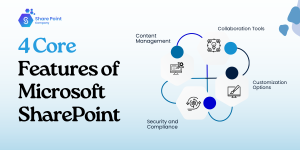
1. Content Management
Microsoft SharePoint development offers a safe place for document storage and collaboration with the ability to ensure that the team works with the most recent version of the file. Since content is easy to manage by way of version control, metadata tag, and powerful search functionality.
2. Collaboration Tools
By using real-time co-authoring, problems, for example, version control, are eliminated since the team is working with the same document. Commenting and tasks improve workflow in the collaborative process.
3. Customization Options
SharePoint application development services offer companies the capability to configure the solutions they need based on the environments that are perfect for their business. It also allows the platform to adapt to various business processes, such that more organizations employ the platform.
4. Security and Compliance
SharePoint is one of the most secure platforms of Microsoft because it includes built-in encryption and access control as well as compliance with the GDPR and HIPAA.
Real Cases Where Microsoft SharePoint is Used
Each of these companies relied on SharePoint to tackle their challenges. Now that we know what SharePoint is and the benefits it has to offer, here are 3 real use cases:
Here are three examples of how companies used SharePoint in their workflows, what challenges it solved, and the impacts:
1. NASCAR
NASCAR manages over 1,500 events yearly with more than 200 employees and vendors per event. Coordinating logistics, communication, and document sharing in real-time across dispersed teams was difficult. Multiple versions of documents and siloed information caused delays and errors.
To solve this, they built an intranet called “Inside Track” on SharePoint Online that:
- Centralized event logistics
- Stored critical files
- Enabled real-time collaboration with co-authoring on shared workbooks.
This improved:
- Communication efficiency
- Real-time updates for crew and vendors
- Faster billing processes.
2. Hershey
Large-scale production and retail demand extensive collaboration between marketing, supply chain, and sales teams. Version control issues with documents slowed decision-making and increased errors.
Hershey uses SharePoint for document management, collaboration portals, and workflow automation integrated with Microsoft 365 tools. The results they saw were positive:
- Increased productivity by ensuring teams work with the latest documents
- Reducing redundant communication
- Automating approval workflows for faster marketing campaigns
- Supply chain adjustments.
3. Goodyear
Coordinating global operations across manufacturing sites requires robust knowledge sharing and compliance tracking mechanisms. Goodyear used SharePoint to create enterprise-wide knowledge portals, track compliance documentation, and automate routine tasks.
In a few weeks, they saw a significant change:
- Better knowledge dissemination
- Faster compliance reporting
- Efficient automated processes
- Reduced operational bottlenecks
- Increased regulatory compliance.
You can also consider using SharePoint automation services if your team lacks the expertise. There are companies out there who can help you.
SharePoint for Different Industries
1. Banking and Financial Services
Banks often face poor online usability and a lack of bilingual content management. SharePoint can be used to build a fully responsive design and integrated content management.
2. Pharmaceuticals and Healthcare
The healthcare industry can adopt SharePoint to support work processes on patient records, ensure compliance, and assist with administrative tasks. Additionally, it can help with:
- Social collaboration tools
- Better search accuracy
- Security simplification
- Improved productivity for doctors, nurses, and staff.
3. Finance and Non-Banking Financial Companies
Such companies can use SharePoint Online document management system and create a centralized platform for all their documents.
SharePoint Online enabled:
- Secure and centralized content with co-authoring
- Offline sync via OneDrive
- Metadata tagging
- Enterprise search
- Improve collaboration between teams.
These examples show that SharePoint adapts well to industry-specific needs. You can use these services yourself or hire a SharePoint developer on your team to help you out.
What SharePoint Plans are Available?
The price range for Microsoft SharePoint varies as of 2025. It can be purchased in a bundle or a standalone plan. Nonetheless, here’s a breakdown:
| Plan | Price (per user/month) | Description |
|---|---|---|
| SharePoint (Plan 1) | $5.00 | Ideal for small to mid-sized teams including:
|
| Microsoft 365 Business Standard | $12.50 | Includes:
|
| Microsoft 365 Business Standard (No Teams) | $10.25 | Same as Business Standard but without Microsoft Teams. Useful for companies using other communication tools. |
Integration Capabilities
SharePoint’s integration capabilities are among its strongest features:
1. Microsoft Ecosystem
Microsoft SharePoint integrates with other applications such as Teams (communication), Outlook (calendar), and Power BI (analytics).
2. Third-Party Tool
In addition to Microsoft apps, the SharePoint framework can interact with most-used platforms, such as Salesforce, SAP, and DocuSign, to build an integrated digital ecosystem for businesses.
3. APIs and Add-ins
SharePoint provides API services that allow developers to create application solutions and application extensions adding to the features of SharePoint.
Challenges and Limitations of Microsoft SharePoint
While SharePoint is a powerful tool, it does have its challenges.
1. Learning Curve
For new users, the already vast and flexible applications of SharePoint may be baffled. Training and onboarding techniques should be proper.
2. Customization Complexities
Although the Microsoft SharePoint development services offer significant flexibility for the platform, it is not easy to create first-party solutions from the package and requires professional or additional help.
3. Cost Considerations
On the other hand, on-premises deployments that contain many advanced features can be expensive when used by small businesses.
Organizations can reap the full benefits of SharePoint by adequately managing these challenges through proper planning and resources.
Tips for Getting Started with SharePoint Framework
To maximize SharePoint’s benefits, follow these tips:
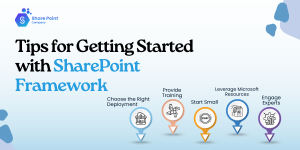
1. Choose the Right Deployment
Plan your SharePoint application deployment based on this article to determine whether your organization needs SharePoint Online, SharePoint Server, or both.
2. Provide Training
Extend much-needed knowledge to your team about the options available in SharePoint to help you adopt it quickly.
3. Start Small
It is more effective if a project management tool is initially simpler and only then extends the functionalities to encompass complex processes such as involving automated workflows.
4. Leverage Microsoft Resources
Follow the link in the article to access Microsoft’s help, guides, webinars, and other support materials.
5. Engage Experts
If customization and deployment seem a little overwhelming, you might want to think about hiring SharePoint specialists.
Wrapping Up
Stop considering Microsoft SharePoint development just as a collaboration solution and look at it as a solution that changes the way an organization works with information and its employees, as well to improve business processes.
If you need more efficiency, data management, and better collaboration, SharePoint provides tools for these ends.
If your business is ready to benefit from SharePoint on the next level, consider getting to know the SharePoint possibilities right now.
Frequently Asked Questions
Q1. What tool is SharePoint?
It’s a web-based collaboration and document management platform. Many businesses use this tool to access the latest versions of their documents and share information securely.
Q2. What is Microsoft SharePoint Used for?
This platform can be used for different purposes such as:
- Content management
- Communicate with team in different departments.
- Organize and access information from any device.
- Integrate smoothly with Microsoft 365 tools
- Document Libraries
Q3. Is SharePoint a CRM tool?
SharePoint has features and functions you can use to make an effective CRM. Whether you need to organize your customer data or track interactions, you can use SharePoint for all your CRM requirements.
Q4. Is SharePoint suitable for small businesses, or is it primarily for large enterprises?
SharePoint can scale very easily and is extremely flexible to suit the needs of various businesses.
SharePoint Online provides small businesses with an affordable, cloud-based solution for collaboration and document management, reducing infrastructure needs.
Large enterprises need solutions like SharePoint Server or hybrid that integrate with legacy infrastructure.
Q5. How does SharePoint ensure the security of sensitive information?
SharePoint includes robust security features to protect sensitive data:
Access Controls: Site owners and managers can define user rights, allowing or restricting access to specific sections of the site.
Data Encryption: At rest and active, the data is secure to avoid the reach of unauthorized personnel.
Compliance Features: SharePoint complies with regulatory requirements like GDPR, HIPAA, and ISO, offering tools for record tracking and privacy control.