
SharePoint Vs Office 365: Who Wins the Battle?
In case you are lost between Office 365 and SharePoint, then you are not alone. Most people find it difficult to distinguish between the two due to their similar features. As much as the war between SharePoint Vs Office 365 continues, they are not the same.
They have varying functions, although they are renowned for complementing each other and facilitating work.
Office 365 is full of programs such as Word, Excel, Outlook, Teams, and SharePoint Online. On the flip side, SharePoint is ideal for sharepoint document management and business-content management.
In this article, we will be looking at the differences between SharePoint Online and Office 365. By the time you finish reading this article, the confusion will end.
Why Does the Confusion Exist?
While many businesses often use Office 365 as a versatile and cloud-based productivity tool, very few know that SharePoint is already running behind the scenes. When you save your documents, you’re saving on SharePoint.
For companies looking to optimize their collaboration and document workflows, partnering with a SharePoint Development Company ensures that SharePoint is leveraged efficiently alongside Office 365, providing clarity and maximum productivity.
So, if you are using Office 365, you’re already using SharePoint. It depends on how you use the platform. The overlap in storage and file sharing is the main reason users confuse the two.
SharePoint: Brief Introduction
This is a web-based platform that helps teams organize, store, and share documents securely. It can act as:
- Content management system (CMS)
- Workflow automation tool
- Document management tool (DMS)
SharePoint has several features that can help you boost your productivity. Additionally, it’s evolved as a highly flexible and customizable platform that works with every Microsoft app.
Office 365: Brief Introduction
Also known as Microsoft 365, is a cloud-based subscription service that provides access to several productivity tools. These include:
- Word, Excel, PowerPoint
- Outlook and Exchange for email
- OneDrive for cloud storage
- Teams for communication
- SharePoint for collaboration
Office 365 is designed for everyday tasks. From writing proposals, managing spreadsheets, to sharing files – It can manage these tasks well. While SharePoint 365 focuses more on internal collaboration, Office 365 offers much more to keep your team productive.
Key Differences Between SharePoint Vs Office 365
Here’s a detailed breakdown of these 2 platforms:
| Feature | SharePoint | Office 365 |
| Purpose |
|
|
| Ideal For | Organizations needing centralized document control or custom workflows | Teams that need ready-to-use productivity and communication tools |
| Storage |
|
|
| Customization | Highly customizable | Limited customization |
| Deployment | On-premises or cloud | Fully cloud-based |
| Integration | Deep Microsoft integration | Native integration across all Microsoft apps |
When to Choose SharePoint?
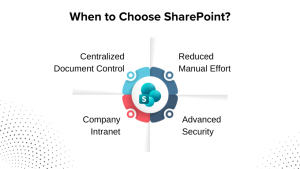
If you’re handling sensitive documents or need a platform for cross-platform collaboration, SharePoint is your safest bet. Here’s why:
1. Centralized Document Control
You’ll have access to all your documents under 1 roof. You can manage different versions and approve access easily with SharePoint.
2. Reduced Manual Effort
Power Automate can help you streamline document approvals, onboarding processes, and project hands off easily.
3. Company Intranet
Many businesses use SharePoint as their internal company website for sharing news, policies, forms, and announcements.
4. Advanced Security
SharePoint lets IT admins control exactly who can see or access specific content.
In case you don’t have an in-house team, you can hire a SharePoint developer to help you get started. With their expertise, you’ll have a structured and compliant platform.
When Should You Use Office 365?
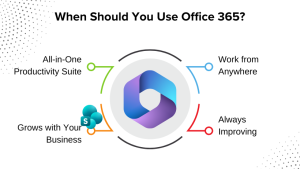
If your goal is to boost productivity and collaboration, Office 365 gives you everything you need in 1 subscription.
1. All-in-One Productivity Suite
Your team can create, share, chat, and meet in one place. Everything you need for collaboration is on a single platform.
2. Work from Anywhere
Your files and emails sync automatically across all devices. Access everything you need, whether you’re at the office or on the go.
3. Grows with Your Business
Easily add or remove users as your team changes. Perfect for businesses that are scaling up or down.
4. Always Improving
Microsoft regularly adds new features and updates. You’ll always have access to the latest tools and integrations.
If your business thrives on flexibility and collaboration, Office 365 would be the ideal solution for you. And without heavy customization.
SharePoint Vs Office 365: Can You Use Both Together?
Absolutely! Businesses like Amazon, Walmart, and Samsung use them together for managing their documents and getting tight security. Your team collaborates on Teams and saves all documents on SharePoint.
This duo allows you to:
- Centralized platform for storing files.
- Manage workflow with ease.
- Secure version control of all files.
You don’t have to choose one over the other. You can enjoy the best of both worlds and use them together.
SharePoint Online Vs SharePoint On-Premises
A quick note worth mentioning: SharePoint comes in 2 versions. SharePoint online and SharePoint premises.
- SharePoint Online: It’s cloud-based and easier to manage. Manual updates and hardware aren’t required.
- SharePoint On-Premises: Gives you complete control over your data. It’s preferred by businesses with stricter data regulations.
If you handle highly sensitive data or have strict compliance requirements, on-premise SharePoint might be better. Otherwise, the cloud version works more smoothly with Office 365.
Office 365 Vs SharePoint: Things to Consider
Before you make your final decision, there are 2 things you need to keep in mind:
1. Cost
Pricing will depend on your setup. SharePoint is included in your Office 365 plan. But if you need more features like advanced customizations or a hosting license, you’ll need to spend more.
2. Security and Compliance
This is 1 area that both shine. However, SharePoint provides a more detailed method. Microsoft 365 has robust security features such as data loss prevention, multi-factor authentication, and compliance tools.
SharePoint provides additional security via configurable permissions, audit logs, and data compliance integration. These features are particularly crucial for firms in finance, healthcare, and government.
Final Verdict: SharePoint Vs Office 365 – Which One Wins?
There’s no right answer. It depends on your business goals and what you’re looking for. Choose SharePoint if you need a customizable and secure platform for document control or have a compliance-heavy workflow.
Opt for Office 365 if day-to-day productivity is important to you. Use both if you want everything – Collaboration, storage, and automation.
Conclusion
They don’t really have a cut-and-dried winner here. SharePoint Online, on one hand, has a lot to offer, and Office 365 does, too. This isn’t a case of either/or, but what you do with them, what you want to highlight.
They’re both powerful. They both can alter how your business functions. And true alchemy happens when you combine technology with your company’s processes and objectives.
Frequently Asked Questions
Q1. What’s the main difference between SharePoint Online vs Office 365?
SharePoint Online is a collaborative work and document management tool. Office 365 is a subscription service that includes several tools. Office 365 includes several productivity tools like Word, Excel, Outlook, Teams, and SharePoint.
Q2. What’s better for my company? Office 365 vs SharePoint?
It depends on what your company does and needs. Select Office 365 if you need email, communications, and document tools together. Select SharePoint if you need a business custom intranet, document management, or workflow automation. Most companies choose both for the best results.
Q3. Can I use SharePoint without Microsoft 365?
Technically, yes. But most businesses use SharePoint Online within Office 365. Using it together ensures smooth collaboration, easier administration, and consistent data security.
Q4. How do SharePoint Online and Office 365 work together?
SharePoint Online gives you the storage and the collaboration behind Office 365. Although Office 365 provides you with the user experience and the Office applications, SharePoint creates the framework and permissions for your firm’s information.